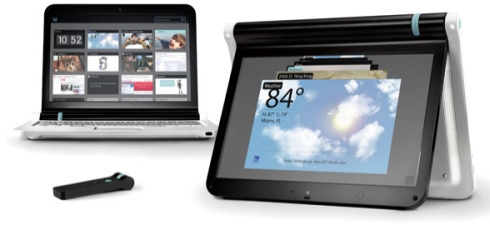
Litl Easel

litl-easel-2

I know what you’re thinking: what is the Litl Easel? It’s apparently a “webbook,” or an internet appliace. It’s designed to get the clutter of an operating system out of the way. The custom operating system will take you straight to the browser and open up multiple windows to do tasks straight in the cloud.

It’s got some nifty features, like the “Easel Mode,” where you can navigate with a wheel and a remote ccontrol. It’s HDMI-ready, so you can plug it into a HDTV and watch your YouTube videos. I’m pretty sure you can do your work here as long as it renders Google Docs and Zoho Office properly.

But for a computer designed to do less, I find it to be a bit pricey. $699 for a computer that’s basically a glorified browser and nothing else? Watch the video and you be the judge.

The Litl has a 12.1 inch display, a 1.6GHz Intel Atom processor and a graphics processor that can handle H.264 video at 720p resolutions and output video to an HDTV via HDMI. It has 1GB of RAM, and 2GB of Flash memory, 802.11g WiFi, mic and headphone jacks and a USB port. It also has 2 infrared ports for using a remote control (which costs an additional $19) to operate the computer.

Do you like this article? Submit it to Blogosphere News!

Posted on November 9, 2009 at by Ade Magnaye

There are 2 Comments


Comments / What do you think?

  1. Comment by Phil posted on
    November 10th, 2009

    Hi

    The litl webbook is much more than a “glorified browser”. We:

    Built the interface to allow integration of webapps and services via our unique “channel” apps. We have a whole slew of these coming down the pipeline. Instead of having multiple learning curves for all these useful web applications and data streams, you’ll only have one

  2. Comment by Phil posted on
    November 10th, 2009

    Continuing (somehow that posted itself):
    ————————————————-
    So we are building a whole new platform aimed at simplifying the web. We’re going to redefine people’s idea of a web-based interface and of netbooks generally.

    We also have a device linking feature so you can link up your litl webbooks and each user will see the same channels. And a sharing feature that means you can very easily share all your pics with remote relatives. No downloading from email Granny will see the shared pics almost immediately.

    Furthermore, ours is a premium netbook, not one of these plastic budget things. We have the best screen on the market for its size – incredible brightness and a huge viewing angle. You can watch our device outside in bright sunshine, and inside from almost anywhere in the room. We have a quality keyboard and a string sturdy casing. And the whole thing was designed by the best industrial designers in the US.

    But the long term vision is about our software. Most interfaces had their birth in the 1990s before the web was ubiquitous. We want to get rid of the claptrap that gets between you and the web experience and streaming data that most users actually want.

    Keep your other old interface “desktop replacement” laptop for the things you use that for. We’re not trying to replace that. The netbook space is already overcrowded with boring mini laptops. Our device is meant for leisure around your home and it’s meant to look good in your home (not in your office). It’s unashamedly a designer item, and it looks great.

    Easel mode is more than navigating with the wheel or remote: our device bends back on itself with a unique hinge so it can stand in an inverted-V, thus putting the screen in a tv-like configuration and reducing the footprint. You can put your webbook in easel mode on your kitchen bench, on your bedside table etc