Originally posted on June 6, 2007 @ 1:37 am
Since the release of Windows XP Service Pack 2 (SP2) Microsoft has integrated DEP (Data Execution Prevention). DEP prevents programs to run executing code from a non-executable memory region. This helps prevent certain exploits that store code via a buffer overflow, for example.
Since its introduction DEP has been a nightmare preventing many legitimate programs to function correctly. Luckily it is easy to deactivate the Windows Data Execution Prevention, completely or for certain programs only.
Before we continue, make sure you have administrative rights.
Go to the Windows System properties (Windows key + Pause Key). Now select Advanced System Settings.
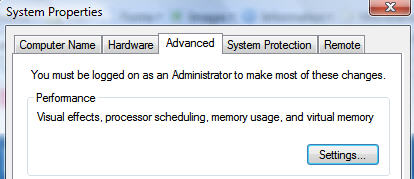
In the advanced systems settings, select the Performance Settings.
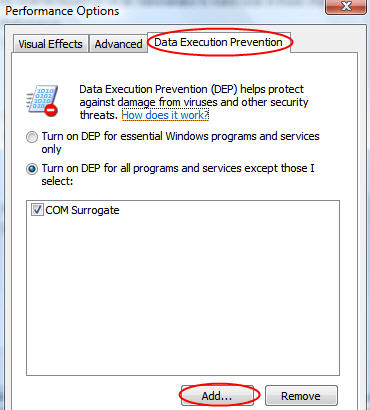
Click now Add and navigate to the program you want to allow. Select it’s executable file and problem solved.
Alternatively you can also deactivate DEP completely.
To fix the all too common COM Surrogate Error in Windows Vista, browse to C:\Windows\System32 and select dllhost.exe.