Archive for the ‘Hacking’ Category

iPod plays FLAC? Yes, if you’ve got Rockbox

One of the biggest shortcomings of the Apple iPod is the fact that it only supports a very limited number of audio formats, namely, AAC, MP3 and WAV. That’s a paltry three formats when other competing music players can support more than five formats. I have nothing against the AAC format that Apple developed. But I am really just much more comfortable with the other audio formats that I personally think sound much better. For example, I think that the FLAC lossless format is far superior to the Apple Lossless format. the logical solution would be to just get these competing players but I Apple’s good customer support and the iPod’s better resale value is something that I just cannot ignore.

What I have done instead is to install Rockbox on my 5G iPod. The Rockbox is basically an operating system replacement to the  existing OS installed in various music players. The plug-in architecture of Rockbox means various features can  be added to further enhance the capabilities of these players.

I’ll write about the other great features of Rockbox at some future time. Right now I am quite happy that with this firmware/OS replacement I can now load my favorite FLAC files on my iPod. These files have now been freed from my laptop. Even OGG files can now play in my machine. Nothing gives a smile to your face than to hear your favorite songs in lossless fidelity. My Tom Waits collection appreciates the upgrade.

Posted on July 28, 2007 at by HLWT

There are No Comments!


How To Deactivate DEP in Windows and Vista

Since the release of Windows XP Service Pack 2 (SP2) Microsoft has integrated DEP (Data Execution Prevention). DEP prevents programs to run executing code from a non-executable memory region. This helps prevent certain exploits that store code via a buffer overflow, for example.
Since its introduction DEP has been a nightmare preventing many legitimate programs to function correctly. Luckily it is easy to deactivate the Windows Data Execution Prevention, completely or for certain programs only.

Before we continue, make sure you have administrative rights.
Go to the Windows System properties (Windows key + Pause Key). Now select Advanced System Settings.
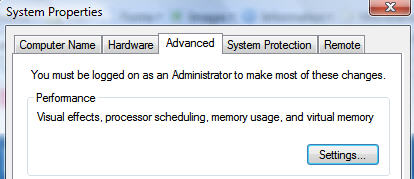
Windows Vista System Properties
In the advanced systems settings, select the Performance Settings.
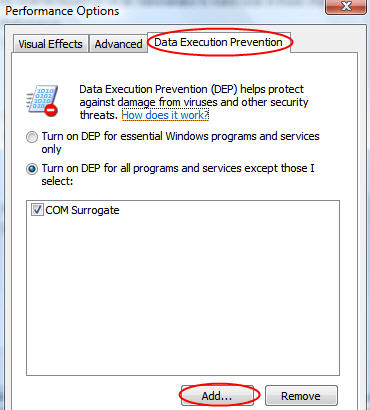
Deactivate DEP
Click now Add and navigate to the program you want to allow. Select it’s executable file and problem solved.

Alternatively you can also deactivate DEP completely.

To fix the all too common COM Surrogate Error in Windows Vista, browse to C:\Windows\System32 and select dllhost.exe.


Posted on June 6, 2007 at by franky

There are 2 Comments!


Passport RFID Chips

Did you know that all passports issued by the US State Department after January 1, 2007 have always-on radio frequency identification chips, making it easy for officials and hackers to grab your personal stats?

If you’re worried about strangers slurping up your identity or your privacy in general, here’s what you can do about it.

Disclaimer: Tampering with a passport is punishable by 25 years in prison, not to mention the “special” customs search with rubber gloves.

I am not instructing you to try these methods, only discussing possible solutions.

The RFID-tagged passports have a distinctive logo on the front cover. The chip is embedded in the back.

Accidentally leaving your passport in the jeans you just put in the washer won’t work to disable the RFID chip. You’re more likely to ruin the passport itself than the chip.

Forget about nuking it in the microwave as the chip could burst into flames, which wouldn’t be good. It would probably leave telltale scorch marks, besides a burnt passport probably wouldn’t smell to nice.

So what is the best approach you might be asking yourself?

Hammer time. Hitting the chip with a blunt, hard object should disable it.

To the best of my knowledge, a nonworking RFID doesn’t invalidate the passport, so you can still use it.

I bet right about now you’re wondering what information is stored on the RFID chips. I’ll tell you… your name, nationality, sex, date of birth, place of birth and a digitized photograph of you, the passport holder.

Eventually, the government contemplates adding additional digitized data such as fingerprints or iris scans.

According to a document I found, the State Department claims it has addressed privacy concerns. The chipped passports “will not permit ‘tracking’ of individuals,” the department said.

I don’t buy it for one second. How about you?

The document goes on to say that the RFID chip “will only permit governmental authorities to know that an individual has arrived at a port of entry, which governmental authorities already know from presentation of non-electronic passports with greater assurance that the person who presents the passport is the legitimate holder of the passport.”

If you have any more information about this exciting violation of our privacy, let me know. Feel free to comment or contact me in private.

Posted on March 4, 2007 at by Laptop Guru

There are 1 Comment!


Four Fingered Biometrics

A small UK startup has launched a new generation of biometric application it claims can totally replace login passwords on both standalone and networked Personal Computer’s.

fingerPIN: The world at your fingerprintsThe patented system, called MatchLogon, from newcomer FingerPIN, has been designed from the ground up to overcome the limitations of conventional biometric systems that have been found to be open to simple spoofing attacks.

Instead of using only a unique fingerprint to gain access to a network or PC, the system uses a sequence of such prints in a random order known only to the user.

To overcome the system, an attacker would need to have access not only to four or more of the user’s fingerprints, but would have to enter them in the correct sequence.

FingerPIN hopes that by using the multi-factor sequencing design of a PIN code in combination with a series of prints unique to an individual, it can convince its target audience in the financial and call center sectors to adopt software that greatly increases security over basic password management systems.

According to the company’s website, the chances of overcoming the print matching engine by chance are one in ten billion.

The software, which comes as a Windows Active Directory-compatible management server and client application, can be made to work with any third-party USB fingerprint reader, including one from Microsoft.

Posted on March 1, 2007 at by Laptop Guru

There are 1 Comment!


Hacker Hits Nuclear Commission Website

Nuclear ExplosionHackers penetrated the Web site for the Canadian Nuclear Safety Commission this week, replacing text and graphics with photos of a nuclear explosion.

The organization, which acts as a nuclear safety watchdog in Canada, reports that there was a security breach on Wednesday, February 7, 2007 during the afternoon.

Commission spokesman Aurele Gervais said “they had the Web site down within five minutes of being alerted to the attack.”

He adds “they are not sure when the hacker broke into the site or how long he or she was there.”

Gervais would only say that the news release section of the site was replaced with graphic images but would not describe them.

It was widely reported in the Canadian press that the images were of a nuclear explosion.

The Ottawa Citizen newspaper published a color photo of one of the pages that had been tampered with but the photo is not shown online.

Aurele Gervais said the attack was limited to the website’s public media section and “there’s been no internal information that’s been compromised.”

Source: Windsor Star

Posted on February 9, 2007 at by Laptop Guru

There are 1 Comment!